eCitizen Login: A Complete Guide to Accessing Kenya’s Online Government Services

In today’s digital world, governments are making services more accessible through online platforms. One of the most successful examples in East Africa is eCitizen — Kenya’s official online portal that allows citizens and residents to access government services from the comfort of their homes.
Whether you want to apply for a passport, register a business, or renew your driving license, the eCitizen portal simplifies the process. In this article, we’ll walk you through everything you need to know about the eCitizen login process, registration, features, and troubleshooting tips.
What Is eCitizen?
eCitizen is a digital platform launched by the Government of Kenya to provide centralized access to public services. Instead of visiting government offices physically, users can log in and complete applications, make payments, and track requests online.
The platform connects multiple government departments under one system, making it convenient and time-saving.
Services Available on eCitizen
After logging in, users can access services from several government departments, including:
- Immigration services (passport application and renewal)
- Business registration
- NTSA services (driving license applications)
- Birth and death certificate applications
- Marriage registration
- Land services
- Police clearance certificates
All these services are available 24/7, making eCitizen highly convenient.
How to Register for an eCitizen Account
If you’re new to the platform, you must create an account before logging in.
Step-by-Step Registration Process:
- Visit the official eCitizen website.
- Click on “Create an Account.”
- Select your account type:
- Kenyan Citizen
- Foreign Resident
- Visitor
- Business
- Enter your ID number or foreign resident details.
- Provide your email address and phone number.
- Create a secure password.
- Verify your account via the OTP sent to your phone or email.
Once verified, your account will be ready for use.
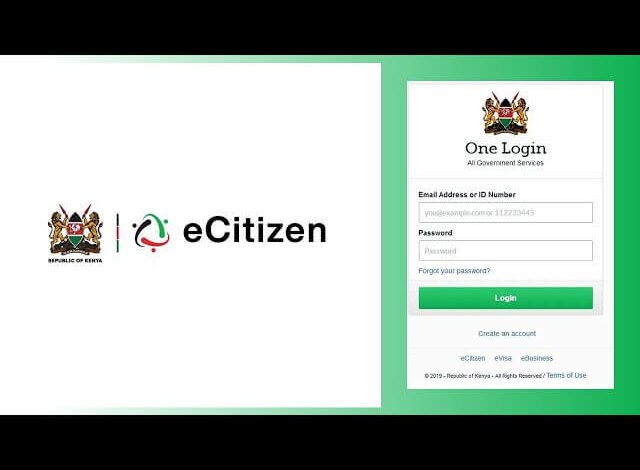
How to Log In to eCitizen
Follow these simple steps to log in:
- Go to the official eCitizen portal.
- Click on “Sign In.”
- Enter your registered email or ID number.
- Input your password.
- Complete any two-factor authentication (if prompted).
- Click Login to access your dashboard.
After successful login, you can select the department and service you need.
Forgot Password? Here’s What to Do
If you forget your password:
- Click on “Forgot Password” on the login page.
- Enter your registered email address or ID number.
- Follow the instructions sent to your email or phone.
- Reset your password and log in again.
Make sure to create a strong password that includes letters, numbers, and special characters.
Common eCitizen Login Issues & Solutions
1. Incorrect Password
- Double-check for typing errors.
- Ensure Caps Lock is off.
- Use the password reset option if needed.
2. Account Locked
- Wait a few minutes and try again.
- Reset your password to unlock the account.
3. OTP Not Received
- Confirm your registered phone number.
- Check your spam or junk email folder.
- Ensure you have network connectivity.
4. Website Not Loading
- Clear browser cache and cookies.
- Try a different browser.
- Check your internet connection.
Security Tips for eCitizen Users
To keep your account safe:
- Never share your login credentials.
- Use a strong and unique password.
- Log out after using public computers.
- Enable two-factor authentication (if available).
- Avoid accessing your account over unsecured public Wi-Fi.
Benefits of Using eCitizen
Here’s why eCitizen is widely used:
✔ Saves time and travel costs
✔ Secure online payments
✔ Easy application tracking
✔ 24/7 accessibility
✔ Reduced paperwork
The platform has significantly improved service delivery and transparency in Kenya.
Final Thoughts
The eCitizen platform has transformed how citizens access government services in Kenya. With a simple registration and login process, users can complete essential applications online without visiting government offices.
If you haven’t already registered, creating an account today can save you time and simplify your interactions with government services.
FAQs
1. Is eCitizen free to use?
Creating an account is free, but individual government services may require payment.
Also Read: Who Is Katie Peterson? A Closer Look at Her Career and Life
2. Can foreigners use eCitizen?
Yes, foreign residents and visitors can create accounts and access selected services.
3. What documents are required to register?
Kenyan citizens need a valid national ID number. Foreign residents require alien ID or passport details.
4. Is eCitizen safe?
Yes, the platform uses secure login and payment systems to protect user information.
5. Can I access eCitizen on mobile?
Yes, the platform is mobile-friendly and can be accessed via smartphone browsers.